

Media Forecaster
What Media Forecaster does, what a plan contains, and which guide to read for each task.
Media Forecaster recommends how to split a marketing budget across your channels, tactics, and campaigns for a period that you choose. You set one goal, a budget, and the media that the plan can use. Media Forecaster then forecasts the period with your marketing mix models and returns a plan that you can compare with your current spend mix.
To open Media Forecaster, select Media Forecaster in the Marketing group of the sidebar.
What can you do with Media Forecaster?
Section titled “What can you do with Media Forecaster?”Media Forecaster answers three kinds of budget question. Each kind is a goal family in the product.
| Goal family | What the plan does |
|---|---|
| Grow on a fixed budget | The plan spends the whole budget and maximizes the outcome. |
| Hit a target | The plan reaches the target that you set for the least spend. |
| Hold efficiency | The plan spends as much as possible while the efficiency ratio stays at the target that you set. |
The goals that you see depend on the active models of your account. Each goal carries the name of a modeled metric.
What does the Media Forecaster page show?
Section titled “What does the Media Forecaster page show?”The Media Forecaster page shows a daily recommendation and the list of plans that people on your team created. The recommendation card shows the estimated lift and the channels with the largest lift.
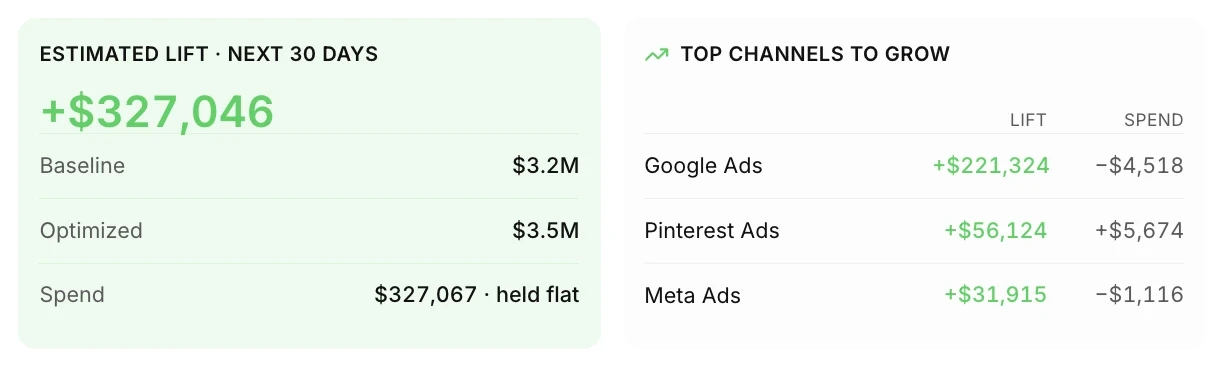
- Default Plan Recommendations is a card at the top of the page. Media Forecaster generates the recommendation automatically each day from your default settings. Select Create plan to open the New plan wizard with the same default settings.
- The plans list shows the name, status, mode, goal, date range, owner, and last update of each plan. You can search, filter, and sort the list.
- New plan starts a plan from the beginning.
How does a plan get its numbers?
Section titled “How does a plan get its numbers?”A plan compares three sets of numbers over the same planning period: the baseline, the optimized plan, and your actual results to date.
- You selectReference periodPast dates that set which media is eligible and the current spend of each row.
- Media Forecaster buildsBaselineThe reference spend mix, scaled to your budget and forecast over the planning period.
- Media Forecaster recommendsOptimizedThe budget moved between rows, inside your spend flexibility and limits, to reach your goal.
- So farActual to dateReported spend and modeled outcome so far in the planning period, paced against Optimized or Baseline.
Read How Media Forecaster builds a plan for the full explanation.
What are the plan statuses?
Section titled “What are the plan statuses?”A plan has one of four statuses. A plan runs in the background, so you can leave the page while the plan runs.
| Status | Meaning |
|---|---|
| Queued | The plan is waiting to start. |
| Processing | The plan is running in the background. |
| Ready | The plan finished and the results are available. |
| Failed | The plan did not finish. The plan page says what happened and how to fix the plan. |