

Attribution reference
Base & Halo Flows options
Reference for the Attribution Base & Halo Flows section, with each chart type, flow filter, grouping tab, and rule.
This page lists the options of the Base & Halo Flows section. For the meaning of Base and Halo, see Modeled and reported figures.
Chart types of the flows
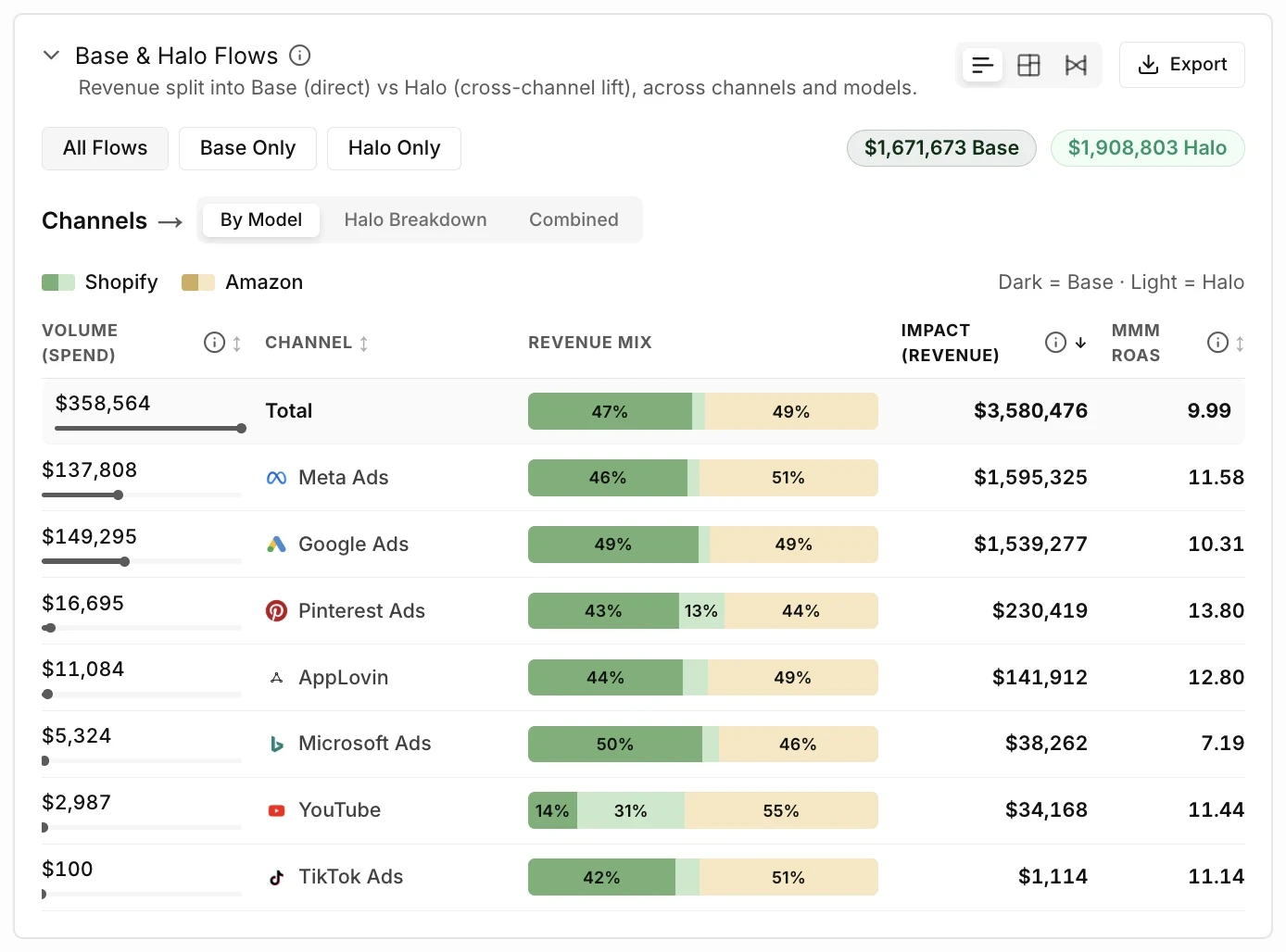
Section titled “Chart types of the flows”The section shows the flows in one of three chart types. The capture shows the Bars type.
| Type | What it shows |
|---|---|
| Bars | One row for each channel, with Base and Halo as dark and light parts. This type is the default. |
| Treemap | One tile for each part. The size of a tile is the share of the part in its channel. |
| Sankey | Flows from each channel to each model or effect. Select a node or a flow for details. |
Flow filter
Section titled “Flow filter”| Filter | What it shows |
|---|---|
| All Flows | Shows Base and Halo. |
| Base Only | Shows only the Base part. |
| Halo Only | Shows only the Halo part. |
Grouping tabs
Section titled “Grouping tabs”| Tab | How it groups the outcome |
|---|---|
| By Model | Groups the outcome of each channel by the model that receives it. |
| Halo Breakdown | Groups only the Halo part by its type. Not available with Base Only. |
| Combined | Groups the outcome by effect, Base and Halo, with all models added together. |
Columns of the Bars view
Section titled “Columns of the Bars view”| Column | What it shows |
|---|---|
| Volume (Spend) | The media spend of the channel in the period. |
| Channel | The name of the channel. |
| {Outcome} Mix | A bar that divides the modeled outcome of the channel by model, with Base as the dark part and Halo as the light part. |
| Impact ({outcome}) | The modeled outcome of the channel. With Base Only or Halo Only, the heading names the part. |
| MMM {efficiency} | The modeled efficiency of the channel. With Base Only or Halo Only, the part is measured against the full spend of the channel. |
| Total | The first row of the Bars view, with the totals of all channels. |
A word in braces stands for a value from your account or your plan.
Flow rules
Section titled “Flow rules”| Rule | Value |
|---|---|
| Onboarding | The section does not appear before your models are approved. |
| Export content | The CSV has a Total row and one row for each channel, with the spend, the Base and Halo amounts, the total modeled outcome, and the modeled efficiency. The file follows the flow filter and is the same for each grouping tab. |
| Totals | Two totals above the chart, one with the word Base and one with the word Halo, cover all data for the page filters. The flow filter does not change the totals. A selected node, flow, channel, or model limits the two totals to the selection. |
Messages
Section titled “Messages”| Message | When it shows |
|---|---|
| Dark = Base · Light = Halo | The key under the Bars view and the Treemap view. |
| Click a node or flow to explore details | The Sankey view when no node and no flow is selected. |
| No flows found for the selected filters. | The section has no flows for the period and the filters. |
| Halo Breakdown is unavailable while Base Only is selected. | Tooltip of the Halo Breakdown tab while Base Only is selected. |
| Showing top {n} of {total} channels · {m} more hidden | The line under a chart that does not show all channels. The Bars view and the Treemap view show 10 channels at most. The export contains all channels. |
A word in braces stands for a value from your account or your plan.
Related
Section titled “Related”- Attribution: the guides and the concepts of the product area.
- Compare channels, tactics, and campaigns: the steps to read the flows of a channel.
- Modeled and reported figures: the meaning of Base and Halo.